guide
How to benchmark OpenRouter models on your own tasks
A public leaderboard tells you how a model does on someone else's benchmark. It doesn't tell you how it does on your prompts, your data, or your definition of a correct answer. Here's a practical workflow for finding that out yourself.
time needed ~10 min · requires OpenRouter API key · runs locally
Why leaderboards aren't enough
Public leaderboards average a model's performance across broad, generic test sets. That's useful for tracking overall model progress, but it answers a different question than the one most teams actually have: will this model do my specific job well, cheaply, and fast enough?
A model that tops a reasoning leaderboard might still be a poor fit for summarizing support tickets in your house style, or classifying your specific taxonomy of intents. The only way to know is to test it on tasks that look like the ones it'll actually run.
The workflow
- Bring your own tasks. A single prompt for a quick check, a CSV of real examples for a proper test suite, or a public Hugging Face dataset if you want a standard benchmark alongside your own.
- Pick candidate models. Any model available on OpenRouter; mix providers and price points freely, since you're comparing against your own tasks, not a fixed catalog.
- Run multiple trials. Models answer the same question differently call to call; running each task more than once and averaging the result keeps one lucky (or unlucky) generation from skewing your read.
- Score with a rubric, not a vibe. Write a short scoring rubric in plain language and have a judge model grade every reply against it, the same process a human reviewer would use, just applied consistently across hundreds of replies.
- Compare quality, speed, and cost together. The model that "wins" on accuracy alone might cost 4x more per correct answer, or feel noticeably slower in a live chat. All three numbers matter together.
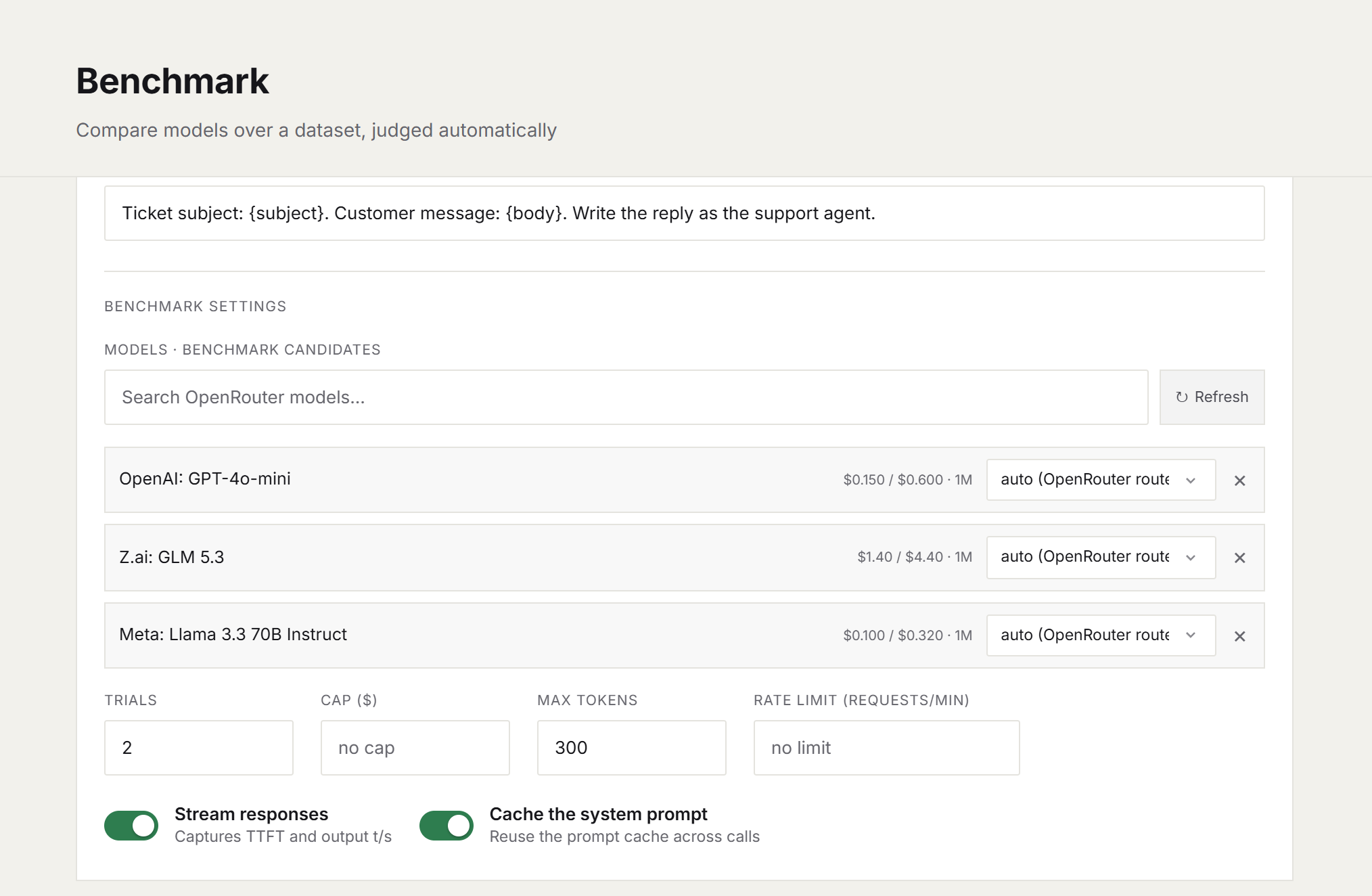
setting up a run: task source, candidate models, trials, optional spend cap
Writing a rubric a judge model can follow
A good rubric anchors the ends of the scale with concrete, specific descriptions rather than vague adjectives:
10: correct final answer, clearly stated, no invented facts.
 5: right approach, arithmetic slip or missing final statement.
 0: wrong answer, hallucinated constraint, or refused the task.
Two things make this reliable in practice: pick a judge at least as capable as the strongest model it's grading, and keep the judge and rubric fixed across any runs you intend to compare, changing either one changes what the scores mean.
Reading the results
Once a run finishes, the number that usually matters most for model selection isn't accuracy alone or cost alone: it's cost per answered task. A model that's 30% cheaper per call but errors or comes back empty twice as often is often the more expensive choice once you divide total spend by tasks that actually got an answer.
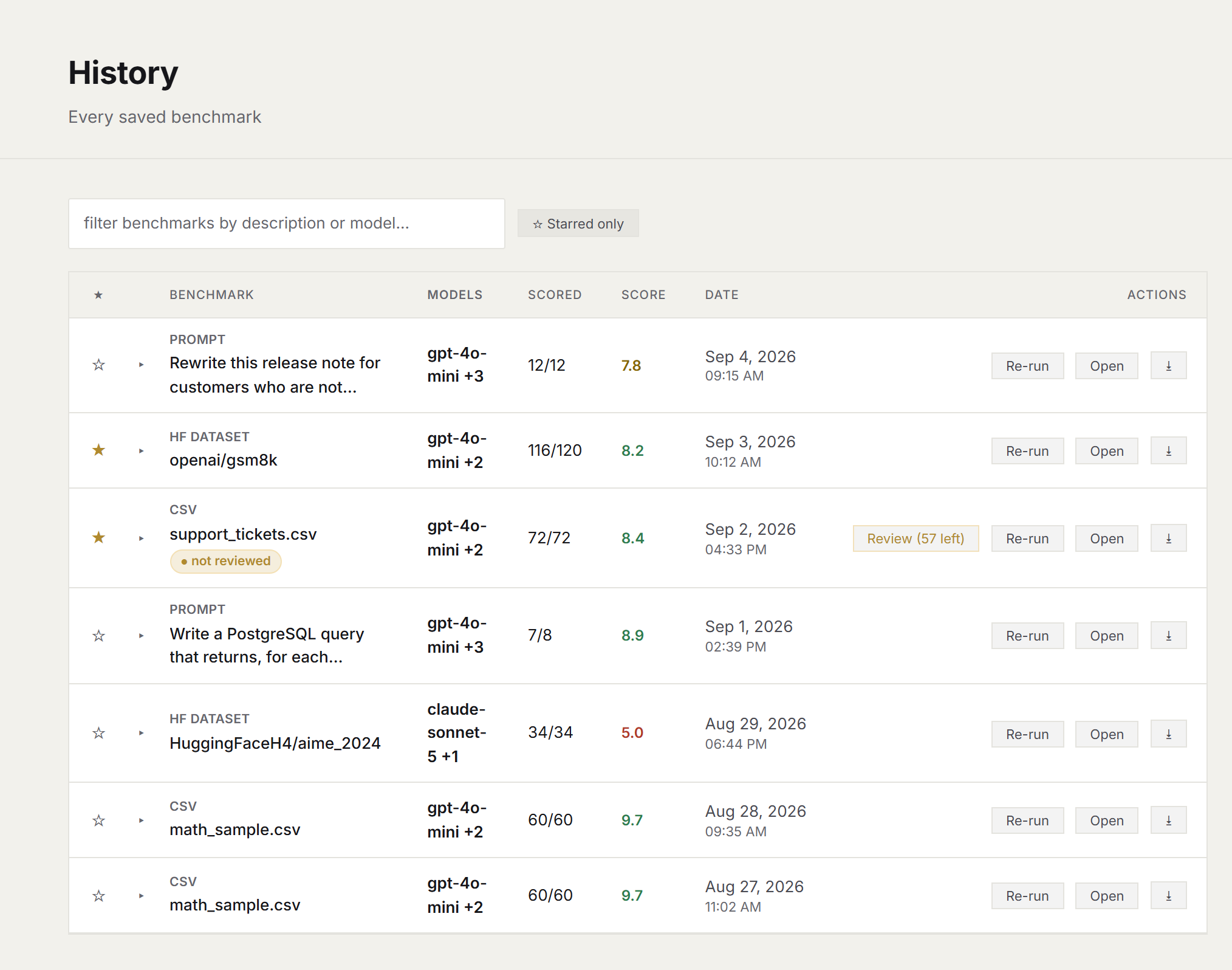
every run is saved: reopen, re-run against a new model, or compare side by side
Saved runs make this repeatable: when a new model ships, re-run the exact same tasks, rubric, and judge against it, and compare directly against your last result, no need to rebuild the test from scratch each time.
To see what the finished artifact looks like, open a real orbench report: a 12-task support-ticket run across three models, with scores, speed, cost and every judged response.
Common questions
Why benchmark on my own tasks instead of a leaderboard?
Leaderboards average performance across broad, generic test sets. The only benchmark that predicts whether a model will do your specific job well, cheaply and fast enough is one built from tasks that look like the ones it will actually run.
Do I need my own OpenRouter API key?
Yes. It is the only way orbench calls a model: your prompts go straight to OpenRouter under your key, and inference is billed by OpenRouter with no markup.
Why run multiple trials per task?
Models answer the same prompt differently call to call. Averaging over several trials keeps one lucky or unlucky generation from skewing the comparison.
What makes a good judge rubric?
Concrete descriptions anchoring the ends of the scale, a judge at least as capable as the strongest model it grades, and a fixed judge and rubric across any runs you intend to compare.
Which number should I pick a model on?
Cost per answered task, alongside quality and speed. A model that wins on accuracy alone can still cost several times more per usable answer.
Try this on your own tasks
orbench runs this entire workflow locally; your prompts and API key never leave your machine.